It arrives as a link
Your friend opens it and sees the card you picked with your message.
Send TOLO balance to anyone with a link. Your friend gets it in their account and spends it in the app or at the counter of any TOLO café.
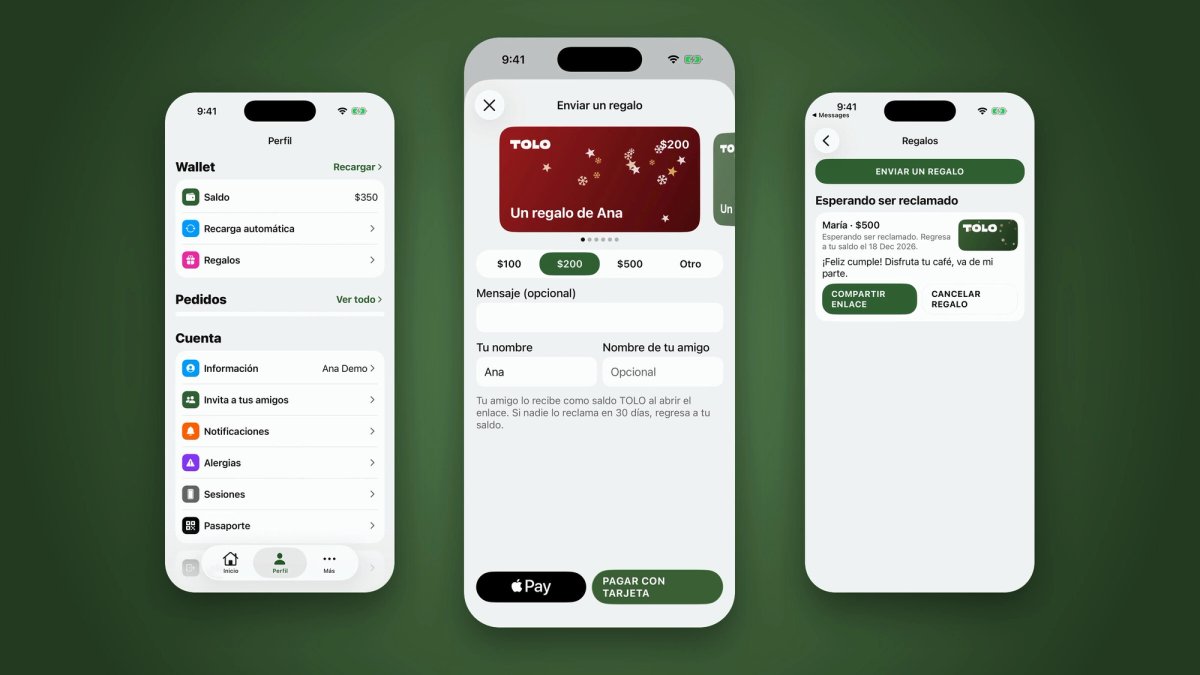
A quick tour of the app, from picking the amount to sharing the link.
Open Profile → Gifts in the TOLO app and tap Send a gift.
Pick the amount and the card: $100, $200, $500 or any amount from $50 to $500, a seasonal design and a short message.
Pay with Apple Pay or Google Pay, or with your card.
Share the link on WhatsApp, Instagram or any app you like.
Your friend opens it and sees the card you picked with your message.
They sign in with their number in the TOLO app, the App Clip or app.tolo.cafe, and the gift is added to their balance.
TOLO balance pays for app orders and at the counter in our cafés.
Animated designs for Christmas, Kings' Day, Valentine's Day and more occasions through the year.
Your friend has 30 days. If nobody claims it, the balance returns to you.
While a gift is pending you can cancel it from the Gifts screen.
From $50 to $500 MXN per gift.
Pay with Apple Pay or Google Pay, or with your card.
No. They can claim it in the App Clip or at app.tolo.cafe with their phone number.
30 days. After that, the balance returns to your account.
On app orders and at the counter in any TOLO café.