A code that is yours
Your personal code, like ANA2026, lives in your profile.
Share your TOLO code with your friends. When they make their first paid purchase, you both earn TOLO balance.
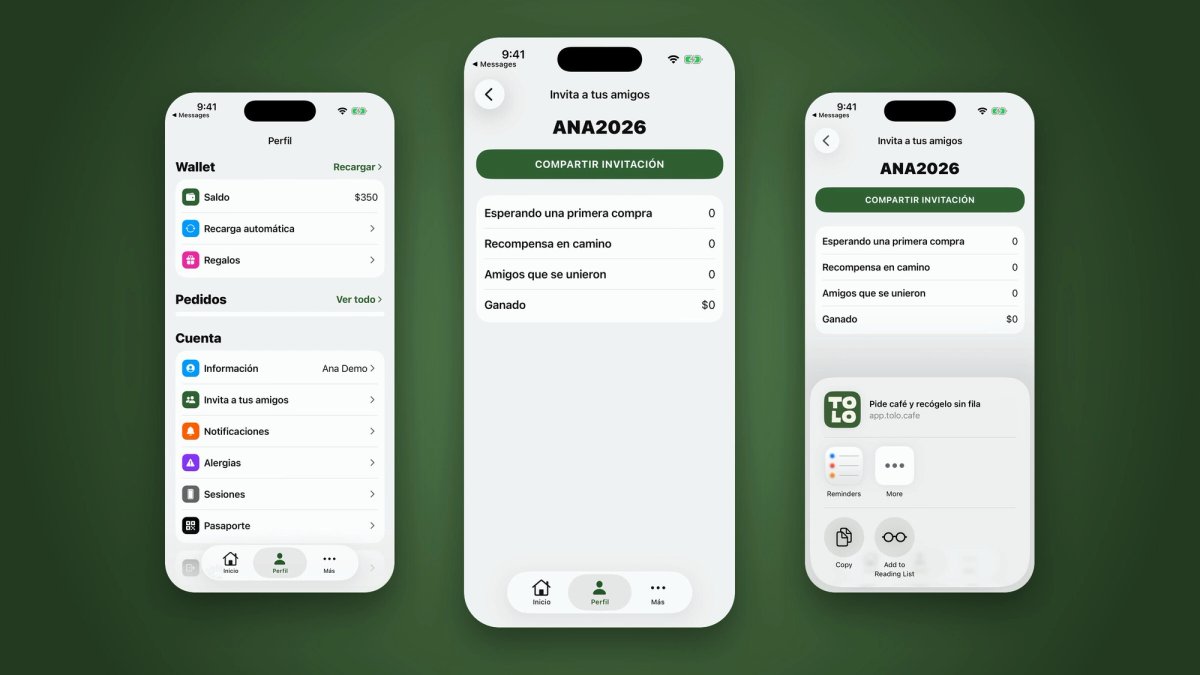
A quick tour of the app, from finding your code to sending the invite.
Open Profile → Invite your friends in the TOLO app to see your personal code.
Share your invite: send your code or your link on WhatsApp, Instagram or any app you like.
Your friend joins: they open your link or enter your code the first time they sign in.
You both earn TOLO balance after their first paid purchase.
Your personal code, like ANA2026, lives in your profile.
Your invite link takes your friend straight to TOLO with your code.
See how many friends joined, which rewards are on the way and how much you have earned.
The code is added when the account is created, so it works for people who do not use TOLO yet.
The amount is shown on the Invite your friends screen in the app.
After your friend's first paid purchase.
The code is added the first time they sign in, so share it before they create their account.
On app orders and at the counter in any TOLO café.